
Add your document
Scan it with your camera, pick it from Photos, or choose a PDF from Files. You can even send one to ignitai straight from Mail or Safari.
No typing, no copy-paste. ignitai reads your receipts, invoices, and bank statements and hands you a clean CSV or Excel file — usually in under a minute.
How it works
If you can take a photo, you can use ignitai. There is nothing to set up and nothing to learn.
Scan it with your camera, pick it from Photos, or choose a PDF from Files. You can even send one to ignitai straight from Mail or Safari.
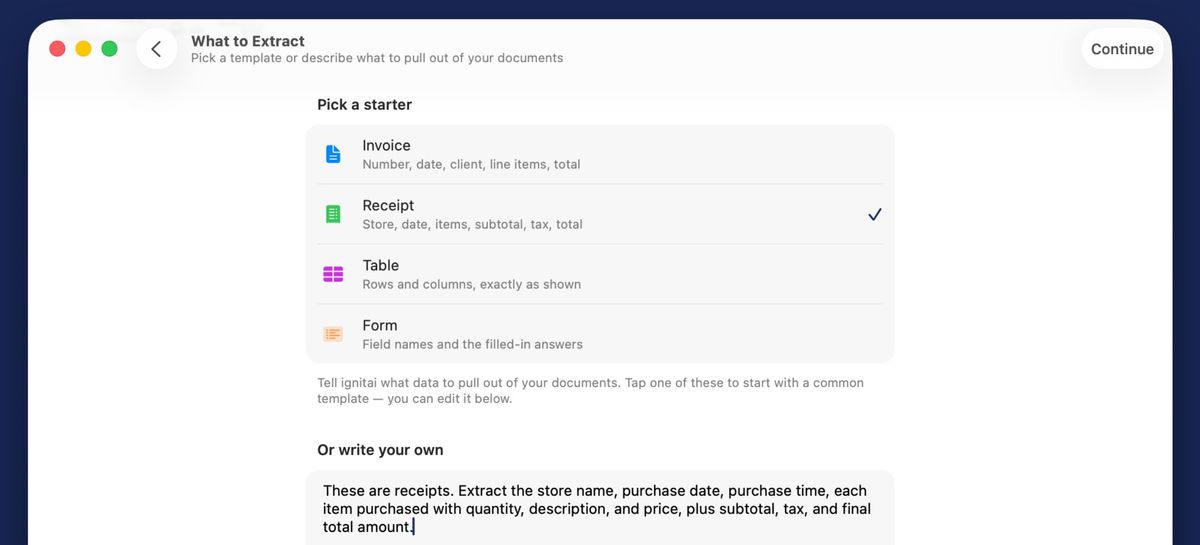
In plain English — "store, date, items, and total." Or tap a ready-made template. No forms, no column setup.
Usually ready in under a minute. Check it on screen, then open it in Numbers, Excel, or Google Sheets — done.
Free download — your first document (up to 4 pages) is on us.
What ignitai does
Built for the moments when you have a pile of PDFs, scans, or photos — and you need the data inside them in a spreadsheet, yesterday.
No rigid forms, no fixed columns. Ask for "date, merchant, amount, and tax" and that's exactly what you get. Want a different layout next time? Just ask differently.
A month of receipts or a stack of invoices becomes one clean spreadsheet in a single go. Ask for the vendor or statement period as a column and every row stays attributable.
Point the camera at a stack of receipts. ignitai auto-crops, straightens, and extracts — you get a spreadsheet, not a pile of photos.
Open the original page while you check the table, and see the total of any amount column to compare with the paper. Excel files hold real numbers, so totals add up the moment you open them.
Your documents are read on your device. On iOS 26, iPadOS 26, and macOS 26, Apple's newest on-device document recognition reads tables, receipts, and invoices natively — sharper columns in, cleaner spreadsheets out.
Your PDFs, scans, and photos are read on-device on every OS version, and the files never leave it. Only the recognized text goes to ignitai’s servers, where the AI builds your spreadsheet; finished files stay in your ignitai account until you delete them.
Who it's for
Bookkeepers, accountants, SMB owners, researchers, and anyone else who's tired of copying numbers out of documents by hand.
Bulk-scan a shoebox of receipts. Export merchant, date, amount, category to Numbers or Excel. Match to your books in minutes.
Import PDF statements from any bank. Get a clean transactions CSV — date, description, debit, credit, balance — ready for your accountant.
Extract line items, totals, VAT, and vendor details from vendor invoices. Feed them straight into your accounting tool.
Turn scanned forms and field reports into structured rows. Custom prompts let you pull any fields you define.
Guides
Walkthroughs for the jobs people bring to ignitai, with the settings that matter.
A step-by-step walkthrough for turning monthly bank-statement PDFs into clean Excel rows on your iPhone — statements read on-device; only the text is uploaded.
Capture paper receipts with the iPhone camera and turn them into a spreadsheet — images read on-device; only the text is uploaded — categories, totals, and tax by row.
Batch a folder of vendor invoice PDFs into one Excel workbook on Mac — read on-device; only the text is uploaded — line items, tax rates, and totals that reconcile.
Turn a scanned PDF into a clean Excel sheet on Mac — no text layer required. The page is read on-device and lands as clean, separated columns.
Turn a folder of PDFs into one consolidated CSV on Mac — one prompt, one pass, one spreadsheet, and your files read on-device; only the text is uploaded.
Turn a year of bank-statement PDFs into one consolidated CSV on Mac — statements read on-device; only the text is uploaded — import-ready for QuickBooks or Xero.
Turn PDF tables into a live Google Sheet on your Mac — the PDF read on-device, only its text uploaded, clean columns imported, totals tied out in under a minute.
Turn any PDF — born-digital, scanned, or photographed — into a clean CSV on your Mac with AI. Read on-device, only the text uploaded, verified in about a minute.
Apple-native
Start a scan on your iPhone, review it on iPad, batch-export from your Mac. Live Activities on Lock Screen and Dynamic Island keep long conversions visible. And it runs on Apple Vision Pro too — your documents in a window in your space.
Pricing
Your first document (up to 4 pages) converts free with Sign in with Apple — no subscription, no card. See exactly what ignitai does with your own document, then subscribe if it earns its place. Cancel anytime in your App Store account settings.
80 pages a week, up to 320 a month. Prices in US dollars; the App Store shows your local price.
Download free and convert your first document (up to 4 pages) on us. Then $29.99/month (USD) for 80 pages a week — cancel anytime if it's not for you.